


INTRO
The Steinberg VST interface technology is used and supported by a large variety of different audio applications on different platforms like Windows, Linux and Mac OS X. This technology is a de facto standard for audio applications, and provides the richest set of functionality for audio plugin programming. jVSTwRapper therefore uses VST as the base technology and translates other audio plugin standards such as Audio Unit (AU) or LADSPA to VST by means of "native stubs".jVSTwRapper therefore is a multi-platform, multi-plugin-technology project, grounded by VST technology. By providing native stubs for each platform and plug-in technology, a single jVSTwRapper plugin runs on three platforms (windows, linux, mac osx) and supports three plugin technologies (VST, AU, LADSPA) without any code changes or recompilation. Multi-platform plugins are created with a single command ([here] is more info).
Please also make sure to check out the [forum] if you find any issues.
[top]
HOW IT WORKS
jVSTwRapper makes it possible toJava programming language
It delegates calls from the host system to an java interface and vice versa. All you have to do is to write a java class that implements the wrapper interface and code the audio algorithm. Providing a user interface for your audio plugin works similar: just implement the respective Java interface. You wont need to touch any native code, operating system specific workarounds or GUI toolkits. Also, no knowledge of Audio Units (AU) or LADSPA is required. You entirely work with Java and the Java version of the VST interfaces.
The jVSTwRapper also enables you to write platform independent (mac/win/linux) plugins. The same files run, without any additional effort (no need for recompilation, no platform specific GUI, etc.) on all platforms. The wrapper itself is a native compiled binary (.so on linux, .vst and .component bundle on the mac, .dll on windows) that invokes a JVM and delegates native calls to the VST plugin implemented in java.
Since VST provides the richest set of functionality amongst all audio plugin standards, the java part of the VST plugin is used to back the Audio Unit (AU) and LADSPA native stubs, i.e.the LADSPA and AU version follow the exact same procedure as the VST version: to the host application, the native stub looks like any other VST, AU or LADSPA plugin. Upon using the plugin, calls are forwarded to their Java-VST equivalent.
[top]
INSTALLATION
- If you dont have java, download it from [http://www.java.com]
- Make sure that you have a correctly installed Java Virtual Machine >= v1.3. To see which version you have, type "java -version" in a commandline window
- [Download] the latest release (make sure to choose the right platform) as a *.zip file and extract it to your audio apps plugins folder. e.g. /VSTPlugins in Cubase. or /Library/Audio/Plug-ins/VST on Mac OSX
- Start your audio app and enjoy the JayDLay demo plugin :-)
- If you want to use jVSTwRapper plugins in a LADSPA host, simply symlink jvstwrapper.so / libjvstwrapper.jnilib / jvstwrapper.dll to the directory where your LADSPA plug-ins are installed (e.g. /usr/lib/ladspa on linux, ~/Library/Audio/Plug-Ins/LADSPA or /Library/Audio/Plug-Ins/LADSPA on Mac OSX or the /plug-ins folder of your LADSPA capable app (e.g. Audacity) on windows)
- Audio Unit (AU) support is documented [here]
TIPS
- Cubase5 users: Please activate "active in background" under "options" in the menue.
- Cubase SX users: Please DEACTIVATE "Plug-in Editors Always on Top" under File->Preferences->VST->Plug-ins in the menu.
- You may also want to take a look at the .ini file to enable the 3 Demo plugins - 1 effect and 2 virtual synthesizers - that now ship with the download.
- In some very rare cases the host crashes when loading the Java GUI. If thats your case, disable the Java GUI by removing (or commenting it out using "#") the PluginUIClass value from your plug-ins .ini file
- Have a look at jvstwrapper.ini AND README.html They contain all the information you need to get started.
- Never ever! call System.exit() or use EXIT_ON_CLOSE in .setDefaultCloseOperation() in your GUI. This exits the JVM and all Java plugins currently running. It also very likely crashes the Host application itself
- If you experience any problems, please do not hesitate to ask around in the [forum]
SCREENSHOTS
Windows
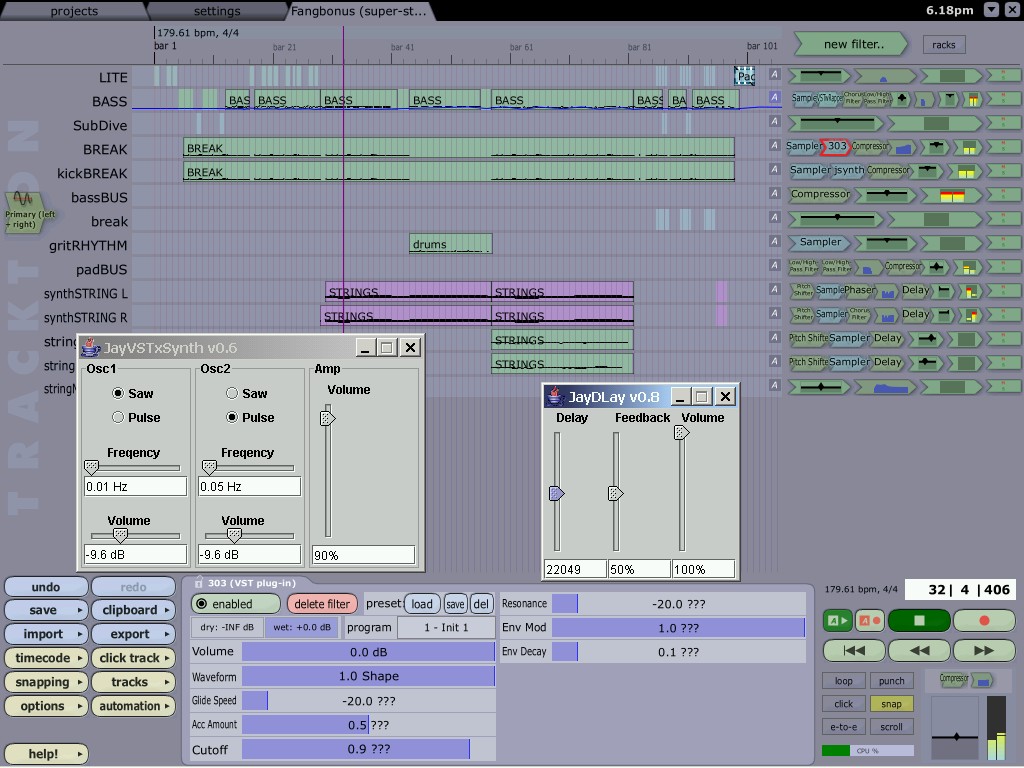
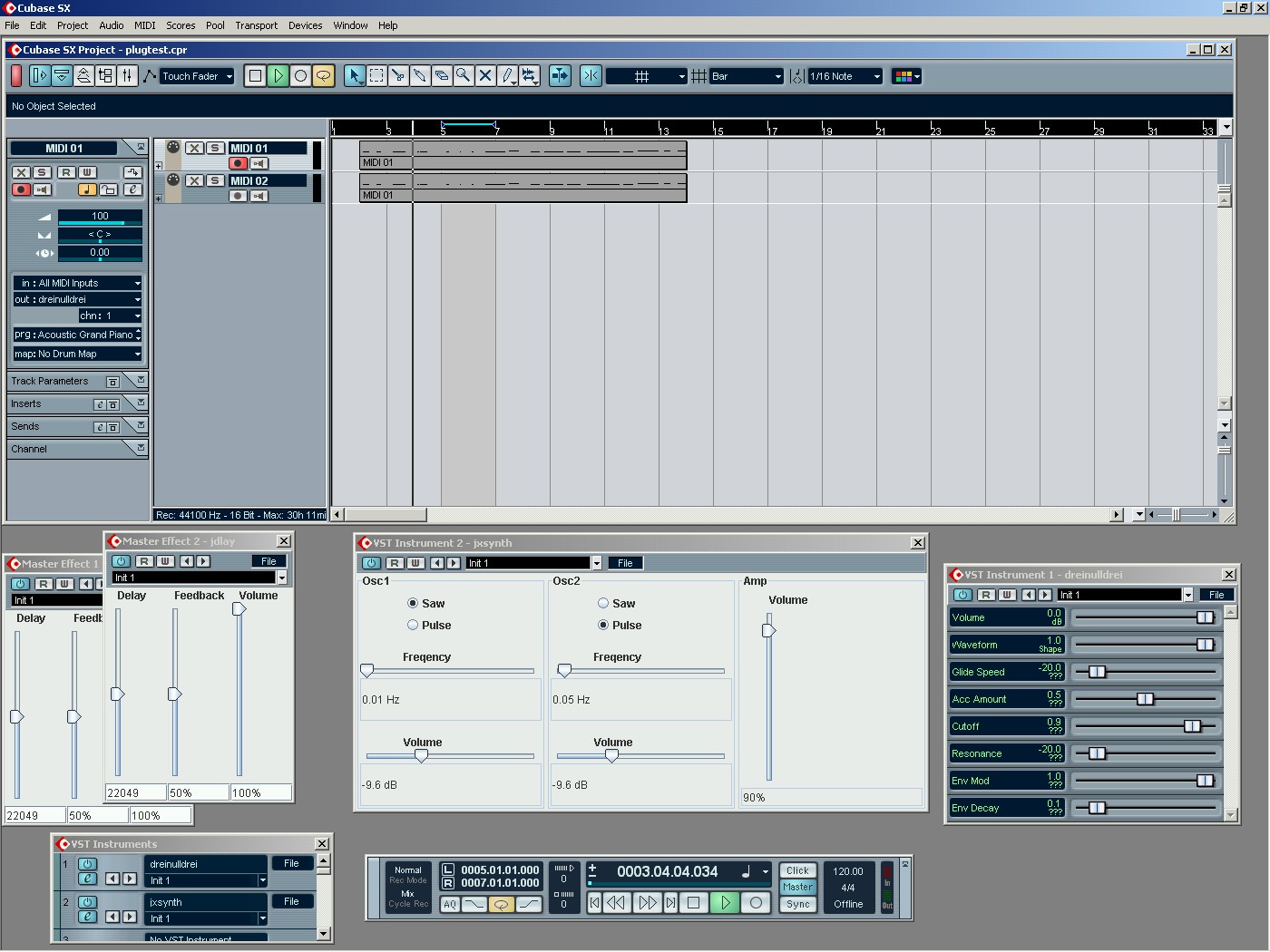
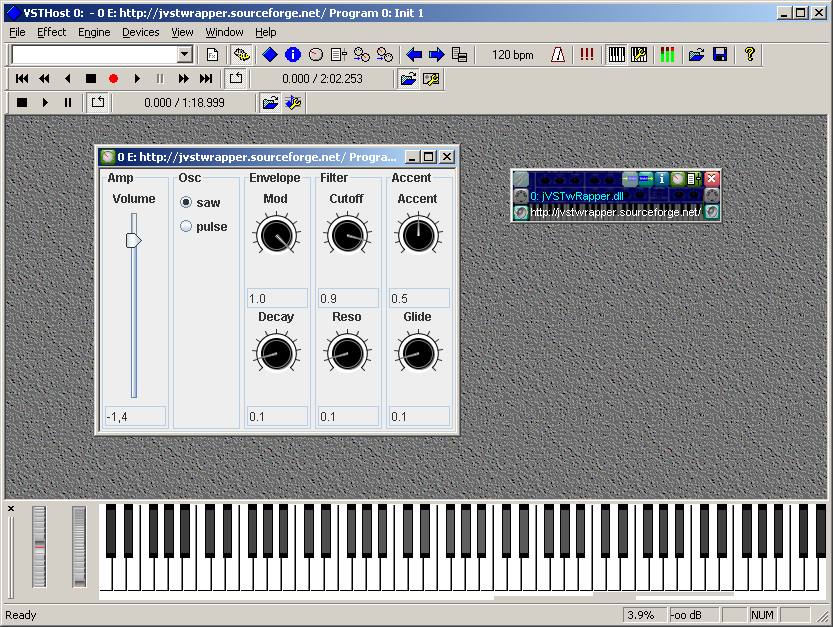
Mac OSX
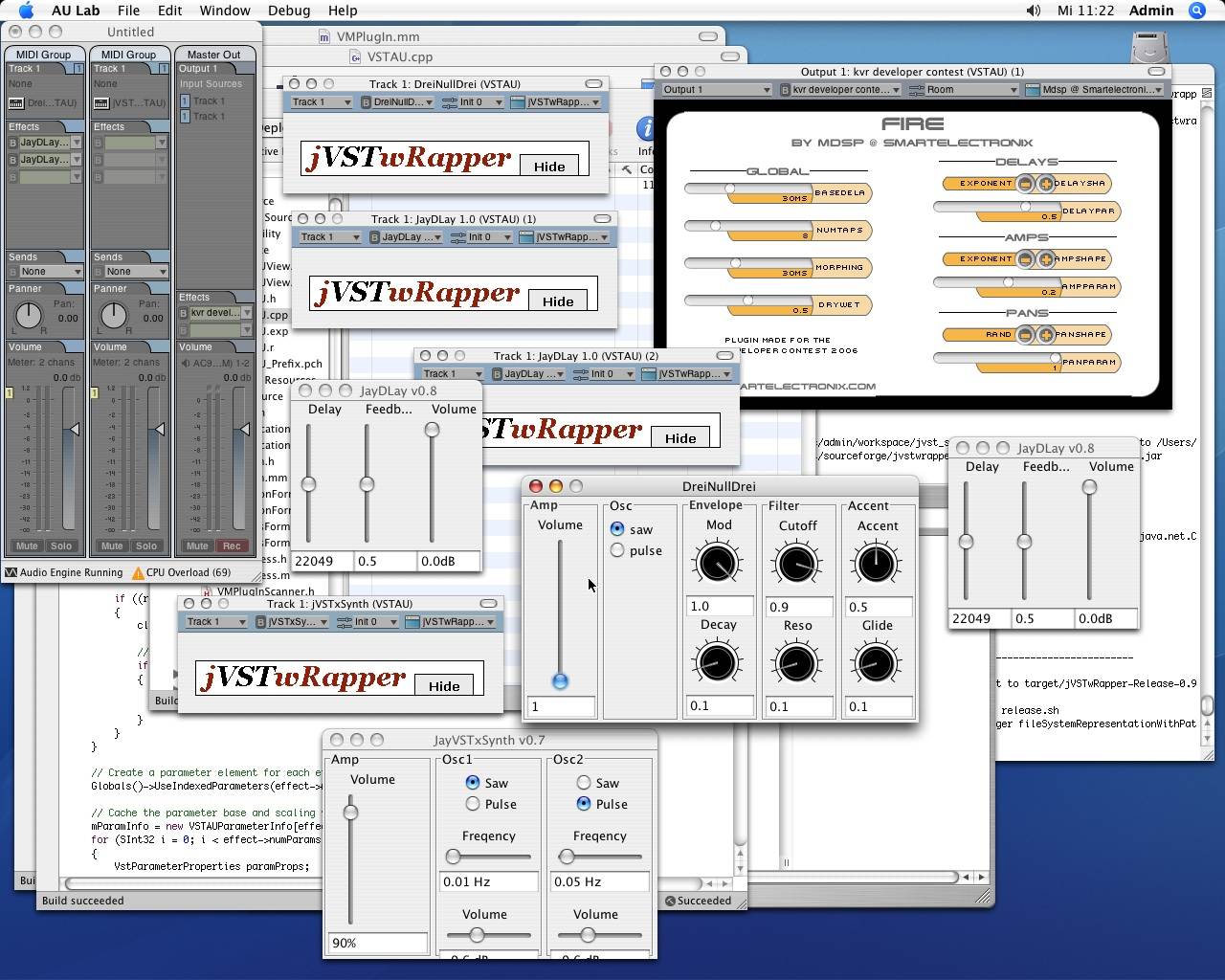
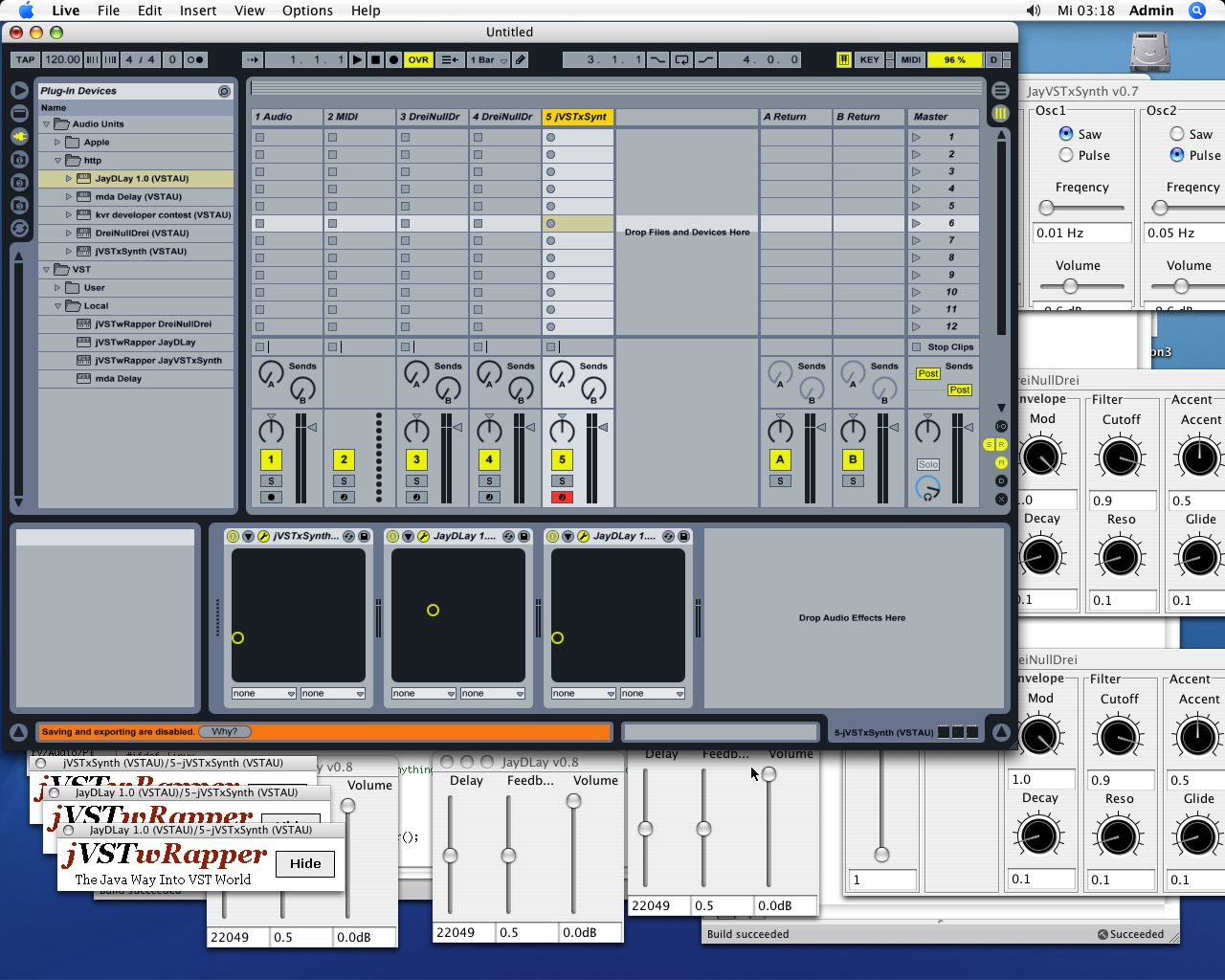

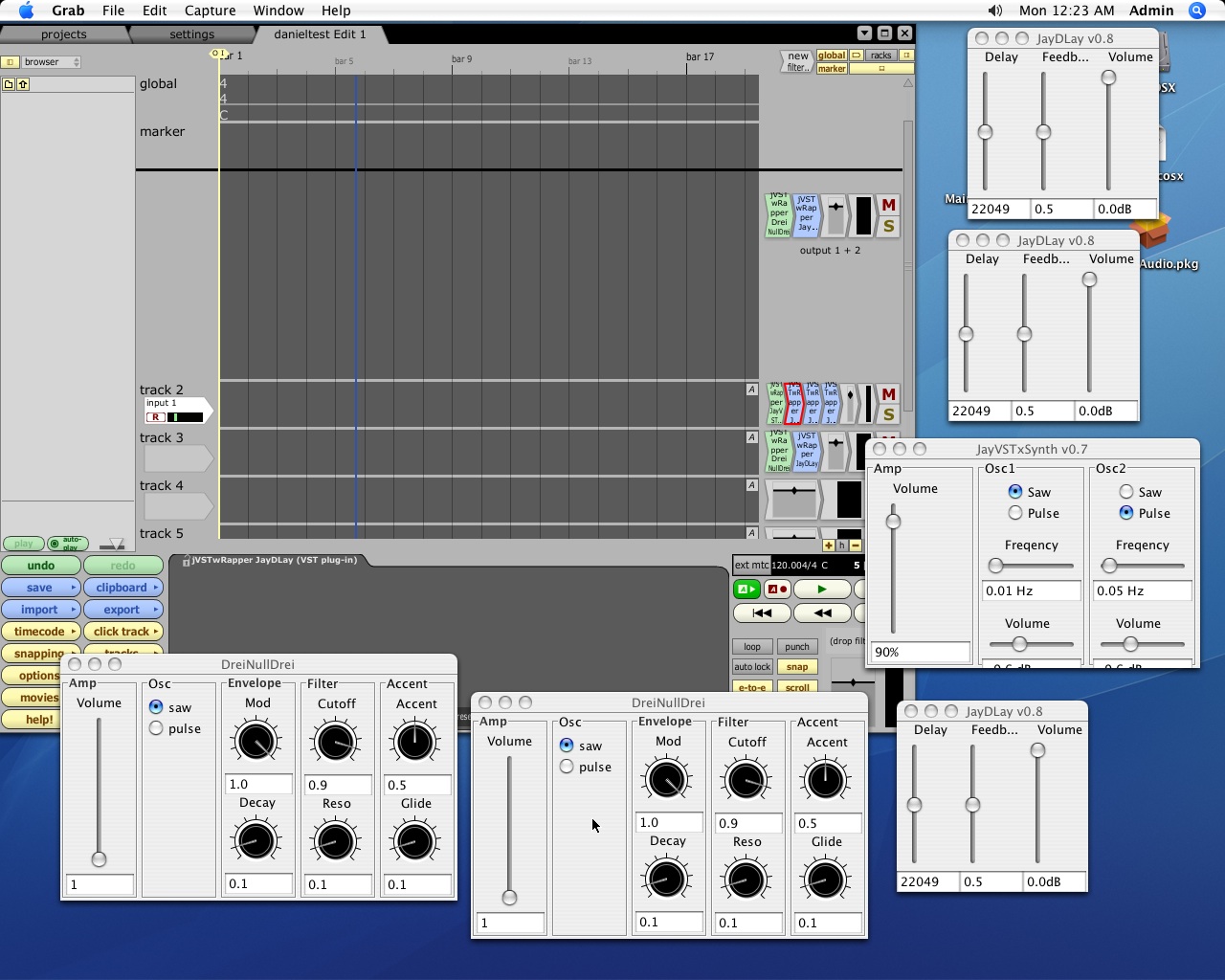
Linux
 |
All three example plugins hosted by Jost on Linux |
 |
2x DreiNullDrei, 1x VSTxSynth and 3x JayDLay in energyXT2 on Linux |
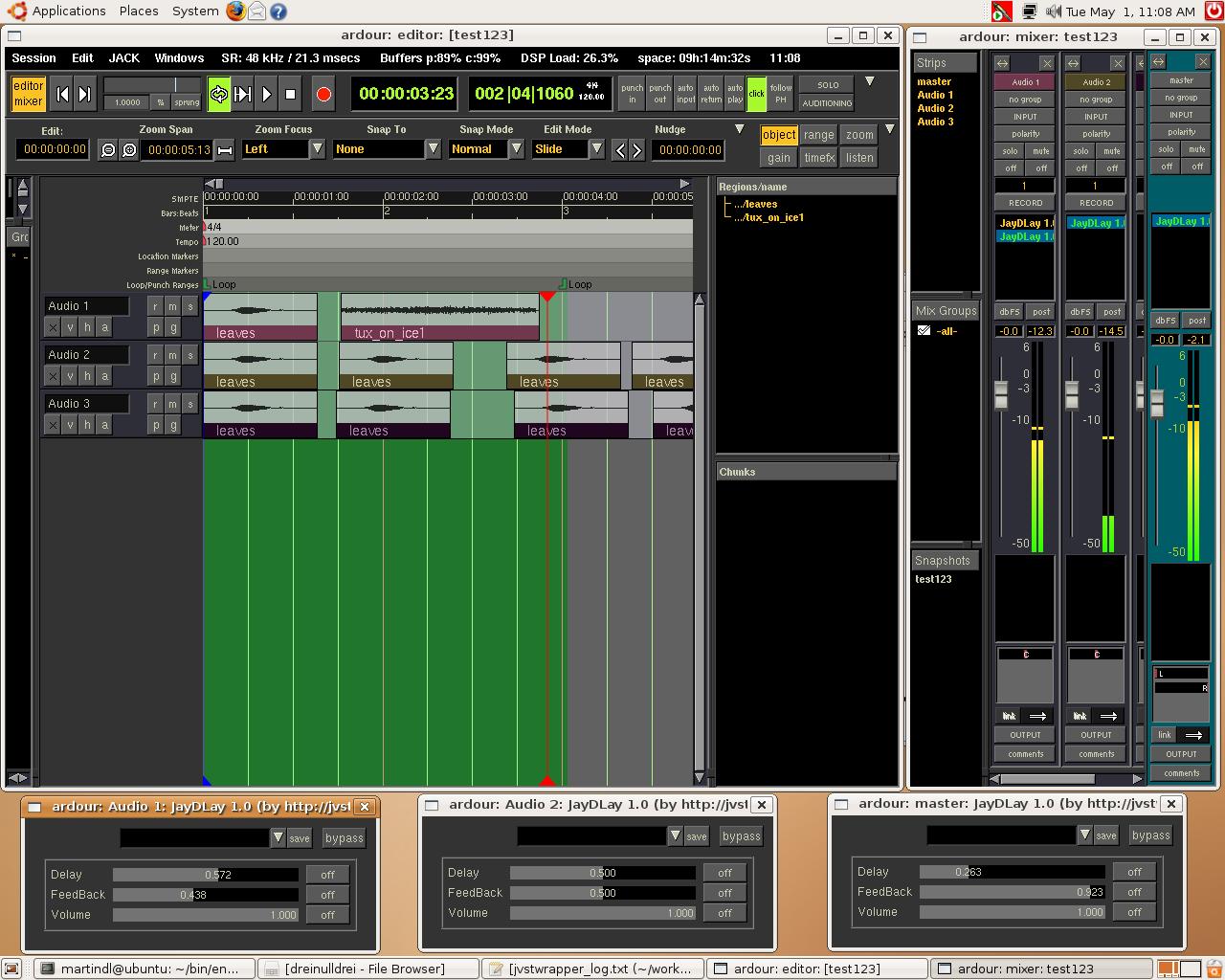 |
5x JayDLay using jVSTwRapper as LADSPA plugin in Ardour |
VST
jVSTwRapper makes Java VST development as easy as possible. Just copy and rename the jVSTwRapper.dll to the name of your plugin (e.g. MyPlugin.dll). On the Mac you can also use any name but make sure you leave the .jnilib extension. Also, edit the Info.plist to reflect the new executable name. The name of the wrapper dll will be displayed as your plugin name in the audio app. MAKE SURE to rename the jVSTwRapper.ini to the same name as the dll e.g MyPlugin.ini. Then edit the properties of the .ini file to fit to your Plugins class name, classpath, etc.If you want to disable the custom UI and use the default UI rendered by the host, simply comment out (prefix with #) the PluginUIClass property from the .ini file
To see how development works on the java side, please see the sources of the demo plugins. And if there are still questions left, leave a message at the [forum].
For documentation please use the javadoc which comes with the download. It is also a good idea to download Steinbergs well documented VST [SDK], the method names are the same on the java side. Also, the old VST SDK 2.0 specification contains some really good information to get started with VST. You can download it from [here].
[top]
LADSPA
jVSTwRapper exposes all plugins as VST and LADSPA at the same time. No additional coding or configuration is required. All LADSPA calls are simply translated to corresponding calls of the VST specification. Please note that the LADSPA specification is very basic, it therefore only covers effect plugins (no synthesizers possible) and also lacks support of customs GUIs.If your plugin is of category synthesizer, it wont be available as a LADSPA plugin. That is the reason why of all 3 demo plugins that come with the download, only JayDLay is available via both, LADSPA and VST. JayVSTxSynth and DreiNullDrei are both synthesizers and therefore not available via LADSPA (A LADSPA host will simply ignore these plugins, you will also find an appropriate error message in the _log.txt file) Also, the GUI of a LADSPA effect plugin is always rendered by the host application. This is why it may look different on each host application you use it. Please ask the [forum] if you encounter any problems.
[top]
Audio Unit (AU)
As of jVSTwRapper v0.9g, Audio Unit (AU) is supported via an integration with [VSTAU]. Seth, the author of VSTAU kindly allows us to redistribute a binary version of his project with the jVSTwRapper download (the sources of the jVSTwRapper patch can be found [here]). To use your jVSTwRapper plugin as an Audio Unit (AU) plugin, follow these steps:- Install (i.e. copy the bundle) your jVSTwRapper VST plugin to /Library/Audio/Plug-Ins/VST/ or ~/Library/Audio/Plug-Ins/VST/
- Start the "VSTAU Manager" application, find your plugin in the list and click "install". This will create a wrapper AU plugin for the selected VST plug.
- You can find the created AU plugin -- named "YourOriginalVSTPluginName (VSTAU)" -- in ~/Library/Audio/Plug-Ins/Components/
- To distribute your plugin as AU, you need to *** SHIP THE VST VERSION AS WELL *** -- the AU version is a wrapper that loads the VST version when started. So, to distribute your plugin add both, the VST and the AU version to a single archive to download. To install from this archive, simply copy both bundles to the folders /VST or /Components in either /Library/Audio/Plug-Ins/ or ~/Library/Audio/Plug-Ins/ (I.e. the .component bundle goes to either /Library/Audio/Plug-Ins/Components/ or ~/Library/Audio/Plug-Ins/Components/ and the .vst bundle goes to /Library/Audio/Plug-Ins/VST/ or ~/Library/Audio/Plug-Ins/VST/. You can freely choose between both folders.)
If, for some reason, VSTAU does not work for your plugin or it causes crashes, you can give [Symbiosis] a try. This is a production ready, rock-solid VST-AU wrapper that was recently open-sourced. I recommed using "Wrapping Alternative" 2 to bundle your AU plugin with Symbiosis. Please refer to the [documentation] for more info.
Please ask the [forum] if you encounter any problems.[top]
JavaFX Plugin GUI
Recently, I worked on a proof of concept VST plugin GUI that uses JavaFX instead of Java Swing (which is the default way to make VST plugin GUIs in jVSTwRapper, see the example VST plugins for details). I case you wonder why: JavaFX is basically an attempt to compete with Adobes Flash to create rich internet apps for the browser. However, it runs on top of the JVM and thus integrates almost seamlessly with Java. Although it is a completely new programming language, or more precisely a scripting language (support for dynamic typing, expressions as params and all the other neat stuff a modern language needs these days) that was explicitly made to create GUIs in a very clean and effective way (unlike Swing ...). Over at http://javafx.com/samples/ are some nice examples you can directly try and run in the browser (or drag them out -- very cool IMHO). Also, have a look at the sources, the code looks very clean and efficient, you can do stuff in 1 line where you literally needed 10 with traditional Swing for example.
Moreover, JavaFX makes the perfect language to write VST plugin GUIs as there is a "Production Suite" that offers plugins for Photoshop and Illustrator to directly export graphics to be used within JavaFX. They call it "A suite of tools and plugins that enables a collaborative workflow between designers and developers. Designers use familiar tools to exchange visual assets with developers building JavaFX applications." Isnt that just exactly what happens when you write VST GUIs?
Since there is good JavaFX support in NetBeans, I created a separate example project for 6.5 with JavaFX SDK 1.0 that includes two demo JavaFX GUIs so that you can see how integration with the rest of jVSTwRapper works. NetBeans with JavaFX support and the JavaFX SDK can be downloaded from http://javafx.com/downloads/. Once downloaded and installed, you can checkout the JavaFX VST GUI example project from the jVSTwRapper cvs as follows:
				cvs -d:pserver:anonymous@jvstwrapper.cvs.sourceforge.net:/cvsroot/jvstwrapper login

				cvs -z3 -d:pserver:anonymous@jvstwrapper.cvs.sourceforge.net:/cvsroot/jvstwrapper co -P JavaFXExamples
Please ask around in the [forum] if
you encounter any problems.
[top]
USING JRUBY TO DEVELOP VST PLUGINS
[Opaz PlugDK] is an experiment that allows to develop VST Plug-ins using the Ruby language (via JRuby). It comes with very nice features bringing the "scripting" approach to VST development. The plugin reloads instantly when a file is changed, e.g. code changes are audible immediately. Absolutely no compile-package-test cycles necessary! It also comes with an IRB console that allows you to attach to a running Ruby plug-in, e.g. to script the plugin live, while it is running (very much like using Ruby as a macro language for the plug-in). Moreover, it wraps the VST API in a very nice DSL, making the code much cleaner and understandable. For increased performance, it is very easy to mix-and-match Java and Ruby code. It also comes with Rake tasks that bundle your plugin for windows, mac and linux righ-away. If you like to read more about the project, please click [here] or go directly to its [github] page.
The screencast introduces Opaz PlugDK and presents live Ruby plugin coding while the plugin is producing audio. Sorry for the stuttering audio track. The screen-recording software ate most of the cpu cycles on the machine I was using to record.
[top]
USING CLOJURE TO DEVELOP VST PLUGINS
[ClojureVST] is a fun prototype that allows to develop VST Plug-ins using a very popular lisp dialect running on the JVM called [Clojure] Apart from the fun it was to actually write the code, the project has a serious background: Clojure is a functional programming language that features a rich set of immutable, persistent data structures and supports type hints and type inference. Its character of a dynamic language and its functional syntax and makes it very efficient to express musical algorithms in very little code. Similar to the JRuby integration, a Clojure VST plugin reloads instantly when a Clojure file is changed, e.g. code changes are audible immediately. Absolutely no compile-package-test cycles are necessary! If you like to read more about the project, please go directly to its [github] page.
[top]
CREATING A MULTI-PLATFORM VERSION OF YOUR PLUGIN
jVSTwRapper is currently available for Windows, Linux and Mac OSX. As VST plugins are native libraries on these platforms, jVSTwRapper provides a native stub (.dll, .so or .jnilib file) that interacts with the java part of the plugin. So, in order to create a version for another platform, download the appropriate jVSTwRapper.zip (that contains a native stub file for a specific platform) from the download page, uncompress the .zip file and replace jVSTeXamples.jar with the .jar file of your plugin. Then edit the .ini file so that your plugin instead of the jVSTwRapper default plugin is loaded. Make sure to keep the directory structure from the .zip file, as some platforms (such as Mac OSX) expect a VST plugin to have a specific directory structure. Thats all, its only a matter of copying some files, no recompilation or dealing with any platform specific APIs is required. You should now be able to load your plugin in your favourite host application.To ease this process, you can automate these steps by installing [maven] and using the example [pom.xml] from the project CVS as a start for your plugin. Simply checkout the jvst_examples module
				cvs -d:pserver:anonymous@jvstwrapper.cvs.sourceforge.net:/cvsroot/jvstwrapper login

				cvs -z3 -d:pserver:anonymous@jvstwrapper.cvs.sourceforge.net:/cvsroot/jvstwrapper co -P jvst_examples
then download the latest jVSTwRapper binaries from the [download] page and extract them to their corresponding location under the 'dist' directory.
NOTE: please follow the instructions of the HOW_TO.txt files in the directories dist/linux, dist/win and dist/osx.
A simple
				cd jvst_examples/dist

				mvn assembly:assembly
is then enough to create 3 zip files (in directory 'target') containing a version of the JayDLay example plugin for Windows, Mac OSX and Linux.
Since we use [maven], again all 3 platforms are supported to carry out these steps.
[top]
PERFORMANCE
Performance is a critical thing, especially in realtime applications. And I can say I was really impressed how well the wrapper performs in comparison to native c++ plugins. But first, some more words on performance in general: We can split this issue into 2 categories: The jni and the jvm performance.The JNI performance isnt very important for the overall performance because this is a constant value added to any call done via JNI. And on todays fast cpus this value gets smaller and smaller. Of course, JNI calls bring an extra overhead, but the wrapper tries to minimize it whenever possible by using in-memory caches.
What we can see now is that the beast here really is the jvm performance. And surprisingly, this isnt a problem at all, as the articles linked below proove impressively.
[Java performance]
[Java numbercrunch performance]
So, in theory, we should only see a small (and constant) difference between native and java plugins. And this is exactly what I saw in my tests. I compared the DelayEditGUI example (C++) from Steinbergs VST-SDK and my java port of it (JayDLay). They use exactly the same processing algorithm. On my PII-450 (WinXP, J2SDK1.4.1) the Wavelab performance monitor shows 3% cpu usage with the native, and 4% with the java version. The difference is about 1% (on a PII-450).Try it by yourself. Download the VST SDK linked below and jVSTwRapper from the download page. The JayDLay plugin is the default plugin. Just unzip the donwload to your plugin directory, start your audio app and see the difference. [top]
TESTED HOST APPLICATIONS
Below is a list of host applications that I tested and can confirm that they work with jVSTwRapper. Please keep in mind that this is only the list of my hosts. jVSTwRapper should work with ANY host application that conforms to the VST, AU or LADSPA specification. If you have any problems with a particular application, please report it to the [forum].Hosts on Mac OSX (VST / AU / LADSPA):
- Ableton Live (using jVSTwRapper as VST and AU plugin)
- Melodyne (using jVSTwRapper as VST and AU plugin)
- Logic (using jVSTwRapper as AU plugin)
- Traction
- Garage Band (using jVSTwRapper as AU plugin)
- AU Lab (using jVSTwRapper as AU plugin)
- LUNA
- Mu.Lab
- Amadeus II
- Amadeus Pro
- Plogue Bidule
- Spark XL
- Audacity (using jVSTwRapper as LADSPA plugin)
- Any host based on the Max/MSP runtime, e.g.: The Ugly VSTi Interface, VST Shell X, ...
- VSTi Host (this one uses Max/MSP Java (MXJ) and spawns a JVM --> simply put a copy of jVSTsYstem_bin.jar into the folder: "/Applications/VSTi Host/VSTi Host.app/support/java/lib")
- MissWatson
- minihost
- All versions of Cubase and Cubase SX
- WaveLab
- Ableton Live
- Logic
- Acid
- Samplitude
- Traction
- Energy XT and Energy XT2
- FL Studio
- Melodyne
- Sonar
- Chainer
- AudioMulch
- Podium
- Orion Platinum
- VSTHost
- Tobybear Minihost
- Cantabile
- Tunafish
- Audacity (jVSTwRapper as LADSPA plugin)
- M-Audio Torq with the Xponent hardware
- Samplitude
- REAPER (Note: This is the first host I found that has a problem with our java GUI --> disable the custom GUI or set AttachToNativeWindow=0 in the .ini file)
- Sony Sound Forge Audio Studio (Note: On display problems, set AttachToNativeWindow=0 in the .ini)
- Adobe Audition (Note: This host doesnt support VST instruments (VSTi), also, only stereo (exactly 2 inputs, 2 outputs) plugins are supported. Please see [this] discussion for details.)
- Jost
- energyXT2
- Renoise
- Qtractor
- Ardour (using jVSTwRapper as LADSPA plugin)
- Audacity (using jVSTwRapper as LADSPA plugin)
- Muse (using jVSTwRapper as LADSPA plugin)
- Rezound (using jVSTwRapper as LADSPA plugin)
HOW TO BUILD FROM THE SOURCES
Just do an anon cvs checkout of the cvs head and make sure to register at steinberg and download the current vst sdk [http://www.steinberg.de/324+M52087573ab0.html]Here are the links to [browse] the sources or anonymous cvs [checkout]. [top]
DEBUGGING OF YOUR PLUGIN
jVSTwRapper makes it very convenient to debug your vst plugin while running inside the host application. Take a look at the .ini file, read the documentation there and uncomment the jvm options for debugging. Then use a remote debug client, e.g. the one that comes with [ecplipse] to debug and step through your running plugin. [top]IF GARBAGE COLLECTION REALLY IS A PROBLEM FOR YOUR PLUGIN
Consider switching the class-GC off (-Xnoclassgc on a SUN VM) and/or use [javolutions] concept of object recycling. Also, consider switching to the concurrent collector (Enabled using -XX:+UseConcMarkSweepGC) or incremental collector (Enabled using -Xincgc). BEFORE YOU APPLY THESE SWITCHES, profile your jvm and BE CERTAIN, that gc really is the problem.This information here is just for your reference. In my 3+ years of java vst plugin development (and from all the feedback I have received so far) - gc never caused any audio clicks or cracks. I always found the problem to be somewhere in the processing algorithm.
Generally, you shouldnt create ANY objects within any of the process* methods (DONT use the new operator there) because these are called VERY often. [top]
PROJECT URL
[http://www.sourceforge.net/projects/jvstwrapper/]DOWNLOAD
[http://sourceforge.net/project/showfiles.php?group_id=92192]STATUS
Currently the wrapper supports the full vst 2.4 specification and works stable on all major vst hosts. The only thing left out from the 2.3 spec is some surround stuff. If there is demand for it Ill implement it, just let me know if youre interested. If any of you test the wrapper with other audio applications, please report to the [forum] if it works.[top]
FUTURE WORK / KNOWN ISSUES
There are a few things I would like to implement and I would love to have some help from the open-source community. So if you find any of the things below interesting and would like to contribute, please let me [know].- Mac OSX GUI refinement: Mac OSX java GUIs work great when using JRE 1.5.0_06 (Mac OSX >= 10.4.8) and above, but in a separate window. It would be nice to let AWT draw into the native window provided by the host application (like it works already in the windows and linux versions). I am trying my best, but this Carbon/Cocoa/Java integration is quite a challenge. If you have some knowledge in these areas or feel challenged by this task, please let me know. Note: since OSX 10.5 (Leopard), there is the [JavaFrameEmbedding framework], this should make things a lot easier.
- DSSI integration: LADSPA works already, but for effect plugins only... DSSI would be the next step for the linux version of the wrapper. There are already some open-source projects (vstserver, dssi-vst) that could serve as a basis for this task. So this shouldnt be that much of work. If you would like to contribute in this area, please le me know
- AU wrapper stability: There may be some stability problems with the default AU wrapper (VSTAU) on Mac OSX. For instance, VSTAUManager seems to crash when the Kore.vst plugin is present. In some other case, the GUI caused problems with VSTAU. So, if you experience crashes with the AU wrapper, please test without GUI enabled (comment out PluginUIClass in the .ini). You can also try to use [Symbiosis] instead of VSTAU for AU support ([here] is more info). In any case, please report problems to the forum.
jVSTwRapper (AND OTHER JAVA/VST RELATED) PROJECTS
[Syn-Thesis]Matthias Birschl created this additive jVSTwRapper synth that stands out not only for its unique sound, but also comes with a very nice Swing UI. "Syn-Thesis is a additive synthesizer with 4 oscillators. The waveform of each oscillator can be created by adding up to 64 harmonics. Syn-Thesis can be used as VST plugin."
[PitchTech LADSPA and VST Plugins]
"A collection of 23 free (jVSTwRapper based :-)) LADSPA and VST plugins related to the PitchTech research project. The plugins can be downloaded for free. You can also listen to audio samples transformed by these plugins."
[VST plugins by Stephan Hotto]
Awesome jVSTwRapper based VST plugins developed by Stephan Hotto (Windows, Mac OSX). The list of plugins includes: Ambiophonics, Parametric Equalizer, Gonio- and Correlation-Meter, Dynamic Compressor, Brick Wall Limiter, Vintage Tube Warmer/Maximizer and Stereo Imager. Currently 11 plugins are available!
[A Pitchshifter VST Plugin (with GUI)]
"Hey guys, I've developed a pitch shifting plugin as part of a dissertation, and if you would like to try it out and give me some feedback about how well you think it works, I'd really appreciate it. You can download the plugin here: [Windows Version] [Mac OSX Version] If you have any questions about how to use the plugin, just post them up here.
[Netbeans VST Plugin Module]
"A module for netbeans that allows quick implementation of the jvstWrapper java-vst programming interface from the new project dialog, including automatically created gui and parameter control."
[MusicBeam]
"MusicBeam is an AU/VST plugin for online music collaboration. By using MusicBeam users can automatically exchange what they recorded in their sequencer and hear everyone elses tracks in sync to their own sequencer. No more bouncing, compressing and emailing your tracks to your bandmates! MusicBeam does it all for you, in near-real-time. It even works across sequencers and platforms by using the platform independent Java technology" - Watch the video [here] for more info.
[Zweeger - The Automation Toolkit]
Zweeger is a modular extended MIDI filter and generator. It works as a standalone tool or as a VST effect. It can be placed between any MIDI input, such as keyboards, and any tool that can be controlled by MIDI messages (effects, samplers, hardware, software...) It can also work without any input as a "simple" generator. Zweeger is composed of various elements, such as LFO, envelops, random curves, delays, note generators, ... All of them can be chained in various ways, synchronized on the tempo. If you are fed up with drawing automation curves, turning knobs repeatedly or if you need a third hand, Zweeger is the tool you need.
[OscVstBridge]
"OscVstBridge is a VST plugin that, as the name implies, bridges VST data to the Open Sound Control [OSC] network domain. VST plugins typically have parameters that are controllable by the user. These parameters appear as the knobs and sliders or as MIDI CC. By using OscVstBridge you can control via your midi controller or VST sequencer OSC devices that are networked to the controlling computer. Similarly OSC controllers can send messages to OscVstBridge that will convert it to VST parameter or MIDI data. By combining the above two setups, VST data or MIDI data can be transported between networked computers. This achieves the same purpose as MIDI over IP systems except that OSC is used as the musical data protocol over the IP network."
[JVAPTools]
JVAPTools is a library and examples for rapid vst-audio-plugin development with Java, based on jVSTwRapper.
The very nice [ScriptEffect] Plug-in (also Java VST) that is part of this package allows you to use a scripting language to prototype audio algorithms. Download it from [here]
[JVstHost]
"JVstHost is an open-source Java-based VST host for Linux, Mac, and Windows. It aims to load and manipulate all audio plugins conforming to the Steinberg VST standard, including those generated with jVSTwRapper and Faust."
[Liquinth a28]
A polyphonic synthesizer based on jVSTwRapper. Martin kindly donated his code to the jVSTwRapper project as another demo synth (thanks a lot!). It is now available via the project [cvs] and also included in the jVSTeXamples.jar binary that ships with the download.
[IC.J.VST]
"Intra-Actively Communicating Java VST", a framework on top of jVSTwRapper that allows "plugin instances to exchange data during runtime, for instance to react to each other and adjust to whatever is going on in all tracks of the entire mix" - definitely worth a look, especially if you plan to create vst plugins that interact with each other. 6 plugins already available!
[Pong]
"pong goes beyond the realm of automatic compositions to find a musical creativity expressed within a simple computer game. It is an implementation of the pong game that works as a MIDI instrument. It produces music as you play the game, based on your actions in the game." Download the Pong VST plugin based on jVSTwRapper [here], or play the game online...
[b0rx0r]
"coming soon... very alpha at the moment :)"
[FraMerS]
Fractal VSTi synthesizer, written in Java with jVSTwrapper
[MunichCodeBrewery]
MunichCodeBrewery is a project for developing sound plugins via the jVstWrapper interface, which is also hosted on SourceForge. It combines the ease and elegance of Java programming with the power of VST.
[JaVaStYle]
If you came here to learn more about java and vst, you may also want to take a look at the [JaVaStYle] Project. This project does exactly the opposite of jVSTwRapper. It is a library that allows you to HOST (native) vst plugins. Except of the wrapping code, this library is also completely written in java - of course. It might be fun to see a jVSTwRapper plugin hosted by JaVaStYle. Just to see if both of the wrapping layers are compatible to each other. If anybody of you already successfully managed to do that, please let me know.
UPDATE: This project disappeared from Sourceforge because of long time of inactivity. You can access the LGPL code from [here]. I can NOT answer any questions regarding this code, this is just for the interested since I occasionally receive some requests about it.
UPDATE 2: JVstHost is out! Consider using this project to host VST plugins in Java-based audio host applications instead (link and more info [here]).
[VSTAU]
"This application creates wrappers for your VST plug-ins that will make them available as Audio Units in programs like Logic Pro and GarageBand." - jVSTwRapper uses this project to provide Audio Unit (AU) compatibility, [here] is more info.
[top]
[Symbiosis]
"Symbiosis is a developer tool for adapting Mac OS X VST plug-ins to the Audio Unit (AU) standard. The project is released free with source code. It essentially consists of a single C++ file that you can compile into your VST project to make the plug-in compatible with the Audio Unit protocol. Optionally, you may choose to use a pre-built "wrapper plug-in" for adapting your existing VST plug-in to the AU standard without even having to recompile any source code." - This is an alternative to VSTAU for jVSTwRapper Audio Unit (AU) compatibility, [here] is more info.
[top]
[beads]
"Beads is an open-source project for computer music and sonic art in realtime performance, installation artworks, web content, and anywhere else you can think of putting it." It is written in Java and comes with [processing] intergration. Check it out!
[top]
CONTACT
Please use the [forum] for questions.Or send feedback via

[top]
